
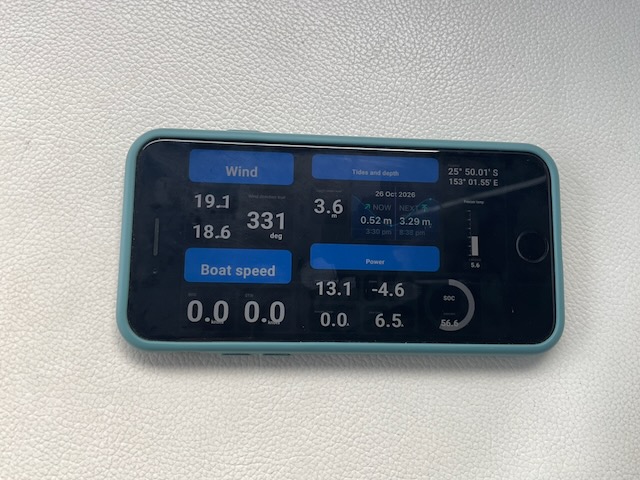
If you would like a dashboard that:
- can show any electronic information available on your boat
- be displayed on any device that has a web browser on it (no new apps required)
- doesn’t (necessary) rely on the internet
- can be used away from the boat (if the boat is connected to internet)
- is based on free opensource software
- can be configured just the way you like it, without deep technical knowledge
then you should read on!
The key components
A boat network of connected devices
This is your NMEA 0183 (the older version) or NMEA 2000 (the newer version), or if you’re on Raymarine SeaTalk or SeaTalkNg or a combination of any of those. On Rara we have Seatalk, SeatalkNg and a couple of NMEA 2000 devices connected to the SeatalkNg network.
The boat network connects e.g. your wind instruments, speed log, AIS, GPS, and chart plotter
A Data Hub
A central system to store data gathered from instruments, sensors etc on your boat.
This is typically a small (inexpensive) computer, e.g. a Raspberry Pi (~AUD100 for a Pi 4) or an old laptop, ideally powered by your 12V house battery. If your boat has a Victron CerboGX, that can also be used, and that is exactly what I did on Rara. There are also other (relatively expensive) and less flexible solutions such as the “Predictwind DataHub” for USD300.
The opensource software of choice is called Signal-k https://signalk.org/ and it comes with a very active community and a vast library of handy plugins to make it do what you want.
For the CerboGX, there’s an option to activate the slightly bigger operating system Venus Large, which includes the Signal-k server, i.e it becomes your data hub.
If you bring your own computer SignalK have free downloads available on the site.
Wifi connection – the CerboGX already has a built in wifi, and most BYO computers would as well.
GPS source – On Rara we have a “GPS USB puck” connected to the Cerbo GX which only costs like $10, but I guess you can use other GPS sources on your network as well.
A connection – boat network to the datahub server
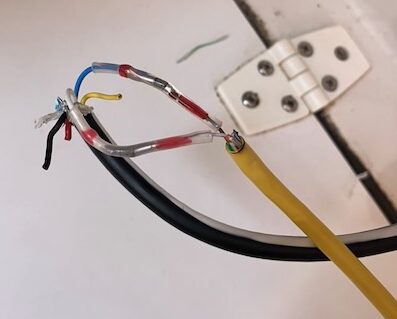
Your boat network needs to be connected to the data hub, so that it gets all it’s information. For the CerboGX it has ports for ve.can which looks like a normal ethernet plug, but the other end needed to connect to the SeatalkNG network and it required two expensive cables (one Victron canbus to NMEA2000 and one NMEA2000 to SeatalkNg) – no good!
Instead I found an instruction on the internet on how to do this, where you cut the ends of an existing cat 5 ethernet cable and one spare SeatalkNg spur cable and connect two of the wires. Since I had these cables already lying around it didn’t cost me anything.
If you’re setting it up without a Cerbo GX there are a number of other solutions to buy on the internet for connecting your boat network to a computer.
How to set it up
Once you installed the Signal-k server you need to install and configure a few plugins, which you do from a webpage you connect to from any computer or tablet on your local boat wifi (or ethernet). For the Cerbo GX installation the URL was http://venus.local:3000
The Signal-k plugins I recommend to get the dashboard working:
- @mxtommy/kip: This is the main dashboard plugin I used. There are others as well if you don’t like the look of it.
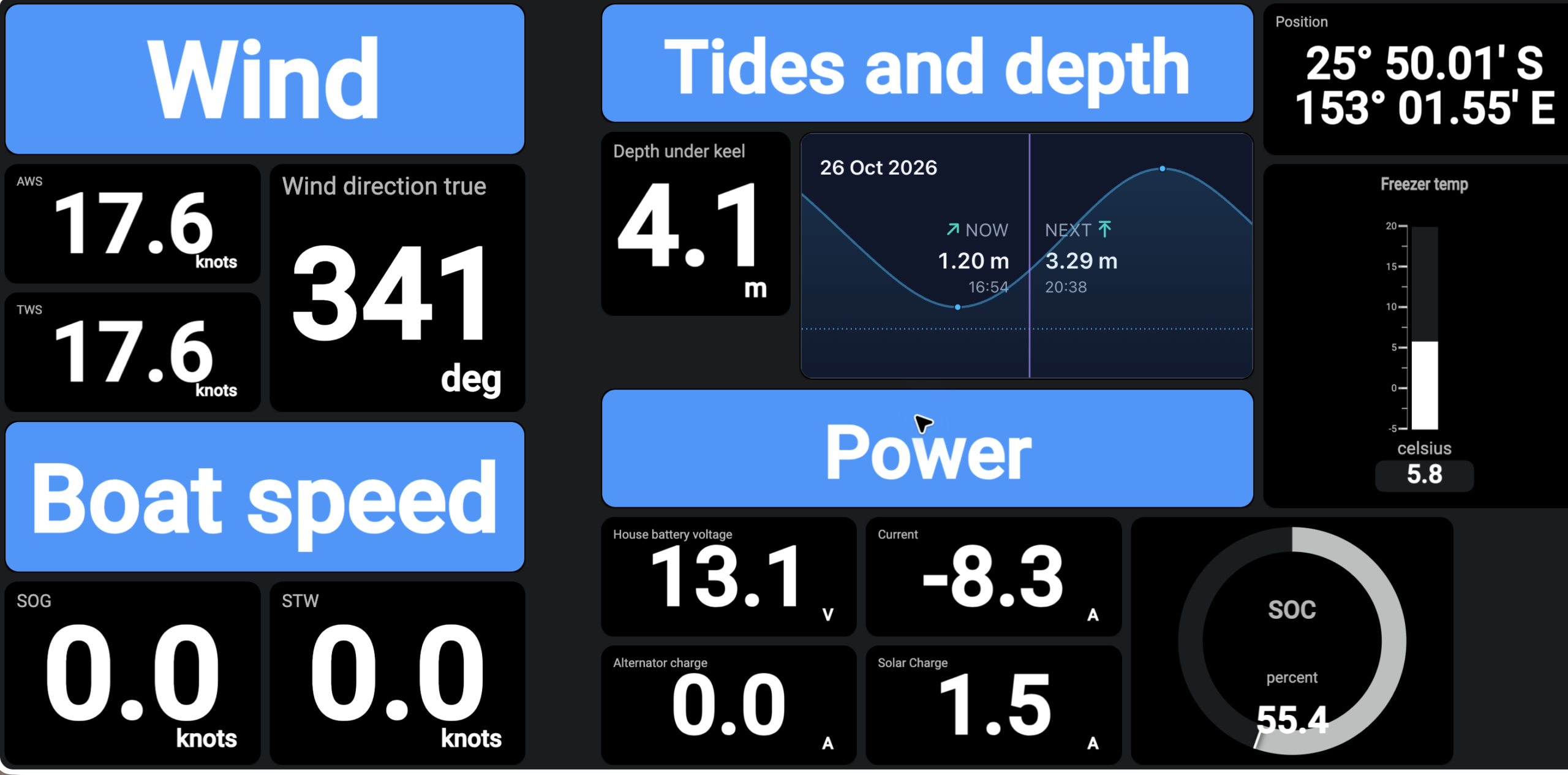
- signalk-tides: Provides local tide information and can be configured as graphical components to put on your dashboard
- signalk-derived-data: Used to calculate data which isn’t readily available, e.g. Calculated true heading and true ground wind speed/direction.
- signalk-venus-plugin: Specific to the CerboGX (or more correctly the Venus OS running on the Cerbo GX). Gives access to all the Victron energy functions such as Solar panel charging, state of charge of batteries, sensors connected etc
The Dashboard plugin Kip, which you open from the signalk browser page, is then configured using drag-and-drop type operations where you decide exactly what information you want on the page.
If all of this seems to hard, or you want to do it quicker, use your favourite AI agent. I used ChatGPT/Codex to help me out as I didn’t have patience to read all the signal k and kip documentation.
What I like about it
- When late at night in the bunk being able to cast an eye on the phone to check how much wind we have and from what direction, as well as the depth under the boat.
- Since we’re often on autopilot these days I may not stand behind the wheel where the instruments and chart plotter are mounted (especially when it’s raining) but still get a view of the key data on the phone or a tablet. We still obviously look forward regularly to check for obstacles and other boats…
- I can configure it with info that is not available on my B&G chart plotter
- Not having to buy an expensive new Raymarine or B&G MFD (Multi Function Display) to achieve some of the above.
- The Navionics app on the phone/tablet can connect to the signal-k server and then provides AIS targets and current depth (assuming those sources are available on the data hub)
This is definitely work in progress and will evolve further in the future.
If you found this useful and also want to hear how I configured an automatic logbook, Anchor Alarm and chart plotter functions leave a comment and maybe I do a follow up. Also, if you want some help in setting up a system of your own give me a shout (nwestling@gmail.com).
Niclas on S/V Rara
Leave a Reply